Don't Build a Ghost Town: A Founder's Guide to Admin Dashboards Ops Teams Actually Use
Your admin dashboard is either a force multiplier or a ghost town. Learn how to build an admin dashboard that your ops team will actually use to save time, reduce errors, and scale your business.

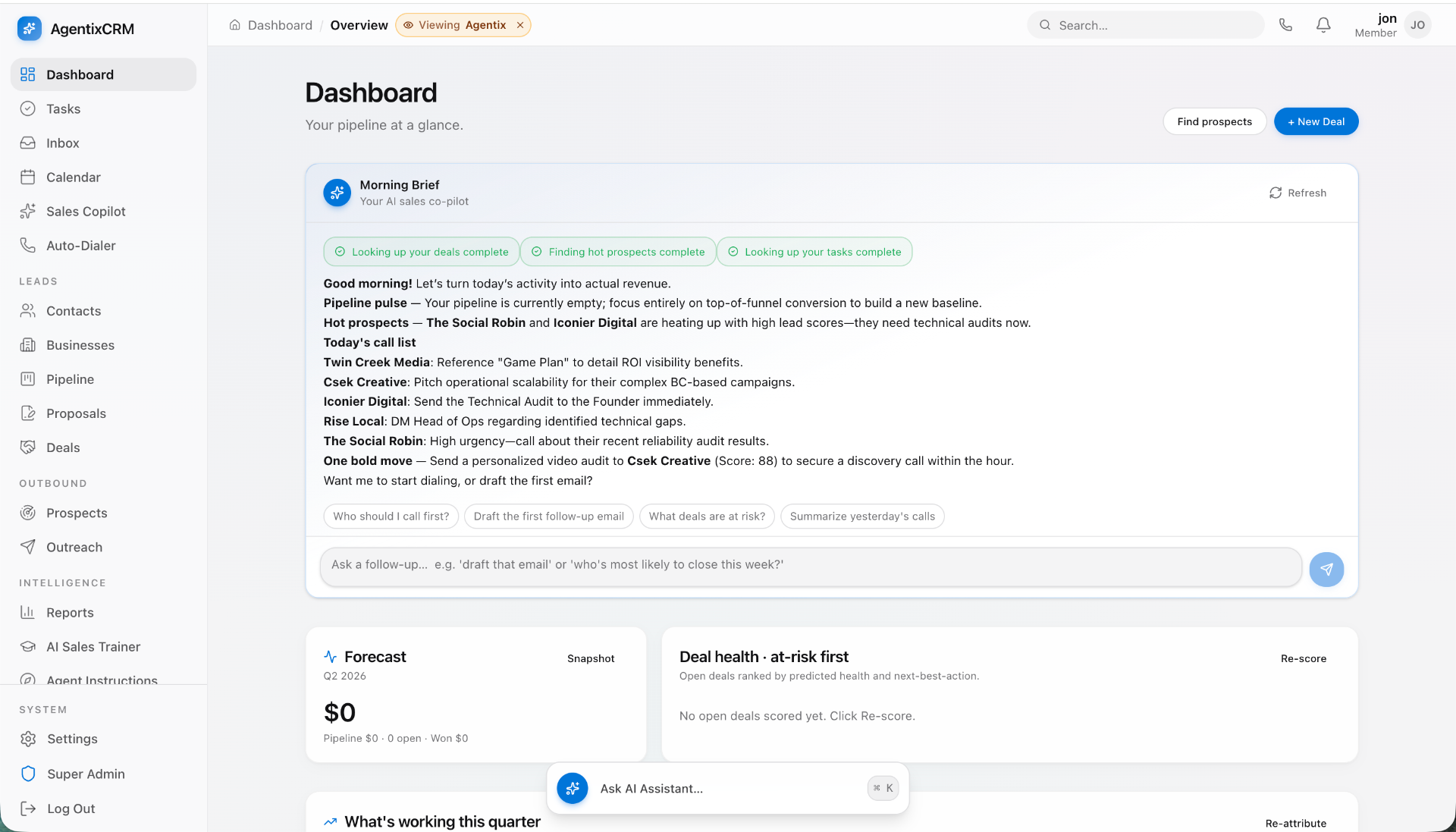
Your admin dashboard is the central nervous system of your business. It’s where your operations team lives—managing users, fulfilling orders, resolving support tickets, and monitoring the health of your entire platform. Yet, for most startups, it's a forgotten wasteland. An afterthought cobbled together with leftover code and zero design input.
This isn't just a minor inconvenience; it's a silent killer of efficiency and a major source of operational drag. A clunky, slow, and unintuitive admin panel forces your team into a maze of spreadsheets, manual data entry, and frustrating workarounds. It burns cash, tanks morale, and puts a hard ceiling on how fast you can scale.
But what if your admin dashboard wasn’t a cost center, but a force multiplier? What if it was a sleek, intuitive cockpit that gave your team superpowers? This is not a fantasy. It’s the result of a deliberate, user-centric process. This guide is your blueprint for building an admin tool that your operations team will not only use but love.
The Hidden Cost of a Bad Admin Panel
Founders often underestimate the compounding financial drain of a poorly designed internal tool. Let's run some simple, painful math.
Imagine you have a 5-person operations team. Due to a clunky admin panel, each person wastes about 30 minutes per day navigating confusing menus, waiting for slow pages to load, and copy-pasting data between three different browser tabs.
- Time Wasted Per Day: 5 people x 0.5 hours = 2.5 hours
- Time Wasted Per Week: 2.5 hours x 5 days = 12.5 hours
- Time Wasted Per Year: 12.5 hours x 50 weeks = 625 hours
Now, let's assign a conservative blended hourly cost of $30 to each team member (including salary, benefits, etc.).
- Annual Cost of Inefficiency: 625 hours x $30/hour = $18,750 per year.
That’s nearly $20k of pure waste, evaporating every year. This doesn't even account for the other, less tangible costs:
- Increased Error Rates: Manual processes are error-prone. A single typo in a refund amount or user email can create a cascade of support tickets and damage customer trust.
- Lowered Morale: Forcing smart people to do robotic, frustrating work is the fastest way to burn them out. High turnover on your ops team is expensive.
- Scalability Ceiling: If your team can barely handle 100 orders a day with the current tools, they will break completely at 1,000. Your internal tooling dictates your operational limits.
A great admin panel does the opposite. It’s a single source of truth, an operational command center that automates the mundane, clarifies the complex, and empowers your team to make better, faster decisions. It transforms your operations from a bottleneck into a streamlined engine for growth.
Before You Write a Line of Code: The User-First Blueprint
Building an admin panel that people actually want to use has very little to do with code, frameworks, or database schemas, at least initially. It starts with radical empathy for the end-user: your operations team.
Step 1: Shadow Your Ops Team
Do not start by asking your team, "What features do you want?" This question invites a laundry list of surface-level wants, not a diagnosis of the core problems. Instead, become an anthropologist. Pull up a chair and watch them work for a full day. Say nothing, just observe and take notes.
- Where do they have multiple tabs or spreadsheets open?
- What information are they constantly copy-pasting?
- When do you hear them sigh in frustration?
- What repetitive sequences of clicks do they perform over and over?
- Listen for phrases like, "I wish I could just…" or "It’s so annoying that I have to…"
These moments of friction are gold. They are your feature backlog. You're not looking for feature ideas; you're looking for broken, inefficient workflows.
Step 2: Define the "Jobs to Be Done"
Once you've identified the pain points, reframe them as "Jobs to Be Done" (JTBD). This framework forces you to focus on the user's motivation and desired outcome, not the implementation.
- Bad: "We need a button to refund users."
- Good (JTBD): "When a customer requests a refund for a duplicate charge, I need to process it in under 30 seconds from their user profile page, so I can resolve their ticket immediately and move on to the next one."
Create a prioritized list of these jobs. Rank them by a combination of frequency (How often does this happen?) and impact (How much time/frustration does this cause?). Your top 3-5 jobs are the foundation of your MVP admin panel.
Step 3: Wireframe the Core Workflows
Now it's time to visualize the solution. Using a tool like Figma, Balsamiq, or even a whiteboard, sketch out low-fidelity wireframes that map directly to your top-priority Jobs to Be Done. Don't worry about colors, fonts, or logos. Focus entirely on the flow and layout.
Does the user have all the information they need on one screen to complete the job? Can they complete the job with the minimum number of clicks? Walk your ops team through these sketches. Their feedback at this stage is infinitely cheaper to implement than after a single line of code has been written. Refine the wireframes until they say, "Yes, this would save me so much time."
The Essential Features Checklist for a V1 Admin
With your user research and wireframes in hand, you can define a concrete feature set. A great V1 admin dashboard isn't about having a hundred features; it's about having the right ten features, executed perfectly. Here's a checklist to guide your scope.
Core Data Management
- Global Search: The single most important feature. A search bar at the top of every page that can instantly find a User (by name, email, ID), an Order (by ID), a Subscription, etc. This is the entry point for 90% of all workflows.
- CRUD Interfaces: Clean, clear tables for your primary models (Users, Products, Orders). This includes the ability to Create, Read (view details), Update, and Delete records. The "Read" view should be a detailed profile page with all associated data.
- Advanced Filtering and Sorting: Allow your team to slice and dice data. For example, on the Users table, they should be able to filter for "Users who signed up in the last 7 days AND have not activated their account."
Key Operational Actions
- One-Click Actions: Identify the most common state changes and make them single-click buttons directly in the table view or on the detail page. Examples:
Approve Post,Ban User,Resend Welcome Email,Cancel Subscription. - State Management: Clear controls for changing the status of an object (e.g., moving an Order from
ProcessingtoShippedor a support ticket fromOpentoResolved). - Impersonation ("Log in as User"): Invaluable for debugging. Gives a support team member the ability to see exactly what the user is seeing, without needing their password. This is a superpower for customer support.
Reporting & Analytics
- Key Metrics Display: An at-a-glance dashboard showing the vital signs of the business: daily/monthly active users, new signups, revenue, churn, etc.
- Simple Data Visualizations: Basic line or bar charts showing trends over time for your key metrics. Don't try to build a full BI tool, just provide context.
- CSV Exports: For any table of data, there should be an "Export to CSV" button. Your team will always need to do ad-hoc analysis in a spreadsheet. Embrace it.
Want this shipped, not just read about?
Book a free scoping call. We'll map the smallest billable wedge of your idea and tell you honestly if we're the right team to build it.
Book a free scoping callSee what we've shipped →
Security & Permissions
- Role-Based Access Control (RBAC): Not everyone should be able to do everything. A customer support agent shouldn't see financial reports or have the ability to delete the entire user database. Define roles (e.g.,
Admin,Support,Finance) and assign specific permissions to each. - Audit Logs: A chronological feed of "Who did what, and when?" If a customer was accidentally refunded twice, you need to be able to trace who performed the action and at what time. This is non-negotiable for accountability and security.
To Build Custom or Use an Off-the-Shelf Tool?
This is a critical fork in the road for any founder. Do you use a no-code/low-code platform like Retool, Forest Admin, or Appsmith, or do you invest in a custom-built solution?
The Case for Off-the-Shelf Tools
Platforms like Retool are fantastic for getting a basic admin panel up and running in hours, not weeks. They provide pre-built UI components (tables, forms, buttons) that you can drag and drop and connect to your database.
- Pros: Very fast to stand up, relatively low initial cost, great for standard CRUD operations.
- Cons: You will eventually hit a "complexity wall." Customizing workflows to match your unique business logic can become a nightmare of Javascript hacks. Per-seat pricing can become prohibitively expensive as your team grows. You're renting, not owning.
- Best For: Pre-seed/seed stage startups with a very standard business model (e.g., a simple blog or e-commerce store) who need something today.
The Case for a Custom Build
A custom-built admin panel is a long-term strategic asset. It's a piece of software that you own, designed from the ground up to perfectly model and streamline your unique business operations.
- Pros: Infinitely flexible and customizable. It can automate anything. It's built for your workflows, not the other way around. The user experience can be perfected. It's a one-time investment that scales with your team without per-seat licensing fees.
- Cons: Higher upfront cost in time and money. Requires dedicated engineering resources (either in-house or through a partner).
- Best For: Companies with unique business logic, those who have outgrown the limitations of off-the-shelf tools, or any business that views operational excellence as a competitive advantage.
This is where a studio like Envert comes in. We specialize in building these mission-critical internal tools. By following the user-first blueprint described above, we build custom admin dashboards that act as an extension of your ops team, rather than a clunky box they're forced to work within. It's about turning operational overhead into a streamlined asset.
Budgeting and Timeline: What Does a Custom Admin Dashboard Cost?
"Custom" doesn't have to mean a million-dollar, two-year project. A lean, high-ROI admin panel can be built surprisingly quickly if it's scoped correctly. We price projects based on a defined scope, not hourly billing, providing you with cost certainty.
Here are some realistic budget and timeline ranges for a custom admin panel built by a US-based studio:
MVP (Most Viable Panel): Focuses on the top 2-3 most painful workflows, global search, and a CRUD interface for 1-2 core models. This is about delivering maximum impact, fast.
- Timeline: 4-6 weeks
- Cost: $25,000 - $40,000
V1 Robust Dashboard: Includes the MVP scope plus RBAC (role-based access), audit logs, CSV exports, and CRUD for all major models.
- Timeline: 8-12 weeks
- Cost: $50,000 - $85,000
Full-Fledged Operational Platform: A comprehensive system with complex, multi-step workflows, third-party API integrations (e.g., Stripe, SendGrid), and custom analytics.
- Timeline: 16+ weeks
- Cost: $100,000+
At Envert, our process for building internal tools starts with a deep-dive discovery phase to map your workflows. We deliver fixed-price proposals that clearly outline the scope, timeline, and cost. A typical MVP dashboard project with us falls in that 4-6 week, $25k-$40k range, delivering immediate ROI by automating your team's most painful tasks from day one.
Revisiting our earlier calculation, an investment of $25k-$40k to eliminate that $19k of annual waste from your payroll pays for itself in 15-25 months on labor savings alone. Factor in the value of reduced errors, higher morale, and increased scaling capacity, and the ROI becomes undeniable.
Designing for Usability: The Unsung Hero of Adoption
A functional tool that's ugly and confusing to use will still be rejected by your team. Great UX/UI isn't just about aesthetics; it's about reducing cognitive load and making the user feel powerful and efficient.
UI/UX Principles for Ops Tools
- Information Density is Key: Unlike a consumer-facing app, an admin panel user often wants to see a lot of data at once. The goal is not minimalism for its own sake, but well-organized density. Use tables, cards, and a clear visual hierarchy to present information without overwhelming the user.
- Consistency is King: A button to
Deletesomething should look and behave the same way everywhere in the application. Standardize your components for actions, statuses, and data display. This builds muscle memory for your users. - Clarity Over Cleverness: Use explicit text labels. "Update User Status" is always better than a cryptic icon that requires a hover to understand. The goal is speed and accuracy, not artistic expression.
- Embrace the Keyboard: Power users live on their keyboards. Implementing a
Cmd+K(orCtrl+K) global action palette where users can type to jump to a page or perform an action is a massive productivity booster. Simple shortcuts for saving (Cmd+S) or cancelling (Esc) are also essential. - Provide Instant Feedback: The user should never wonder if their action worked. Use spinners on buttons during an action, show a success/error message (a "toast") after completion, and use confirmation modals for any destructive action like deleting a user. This feedback loop builds trust and confidence.
Building an admin dashboard that genuinely empowers your team is one of the highest-leverage investments you can make as a founder. It’s the difference between scaling gracefully and being crushed by your own operational weight. Stop letting your team fight a losing battle with spreadsheets and clunky interfaces.
If you're ready to turn your operational chaos into a streamlined competitive advantage, let's talk. Book a free, no-obligation scoping call with the Envert team. We'll help you map your critical workflows and scope a custom internal tool that your team will actually love to use.
Frequently asked questions
How much does a custom admin dashboard cost?+
A custom admin dashboard can range from $25,000 for a focused MVP to over $100,000 for a comprehensive platform. A typical V1 with core features usually lands in the $50k-$85k range. The price depends entirely on the complexity of your workflows and the number of features scoped.
Can't I just use a free open-source admin template?+
Admin templates provide a great starting point for the user interface (UI), but they are just a visual shell. The real work and cost in building an admin panel is in the backend engineering: creating secure APIs, integrating with your database, and coding the specific business logic for your operations. The template is the easy part.
Retool seems so much cheaper. Why would I build custom?+
Retool is excellent for simple data management but its per-user pricing can get expensive as you scale your team. More importantly, you'll eventually hit a ceiling when trying to implement highly specific, proprietary business logic. A custom build is a one-time investment that becomes a permanent, perfectly-tailored asset you own.
How long does it take to see ROI on a custom admin panel?+
The ROI is often visible within 12-18 months based on saved labor costs alone. When you factor in the value of fewer errors, increased operational capacity, and higher team morale, the payback period is even shorter. The goal is to automate your most time-consuming tasks first to see returns quickly.
What's the very first step to building a better admin tool?+
Put the keyboard away and don't write a line of code. The first and most critical step is to shadow your operations team for a full day. Observe their actual workflows, identify their pain points and workarounds, and map out exactly where time is being wasted. This direct observation is your blueprint for success.