How to Build a B2B Customer Portal: The Founder's Guide to Scaling a Service Business
Thinking about how to build a customer portal for your B2B service business? This guide covers features, costs, timelines, and the build-vs-buy decision to help you scale operations and delight clients.

Your B2B service business is running on a chaotic stack of email, Slack, Google Drive, and a dozen spreadsheets. You’re delivering great work, but the operational overhead is killing you. Client communication gets lost, the wrong file versions are used, and your team spends hours each week on manual status updates and reporting.
This is the glass ceiling for service businesses. You can't scale by simply hiring more people to manage the chaos. The answer isn't another subscription tool; it's a strategic asset. A custom customer portal.
Let's be blunt: a well-built client portal is not a 'nice-to-have.' It’s a machine for scaling your operations, a moat that makes your service stickier than your competitors', and a platform for future revenue. It transforms your service from a series of manual tasks into a streamlined, productized experience.
This guide is for founders, CTOs, and operators who are feeling that friction. We'll walk through exactly why you need a portal, what features are non-negotiable, the critical build-vs-buy decision, and what it realistically costs in time and money to build one right.
Why Your Service Business Needs a Portal (And Not Just a Better Spreadsheet)
The benefits go far beyond simple organization. A custom portal fundamentally changes the economics and defensibility of your business.
Scale Your Operations Without Scaling Headcount
Every manual, repetitive task your team performs is a drag on profitability. A portal automates the grunt work. Think about the hours spent on:
- Client Onboarding: Manually sending welcome packets, collecting credentials, and scheduling kickoff calls.
- Status Updates: Compiling progress reports, answering “where are we with X?” emails.
- Reporting: Pulling data from five different sources into a monthly PDF.
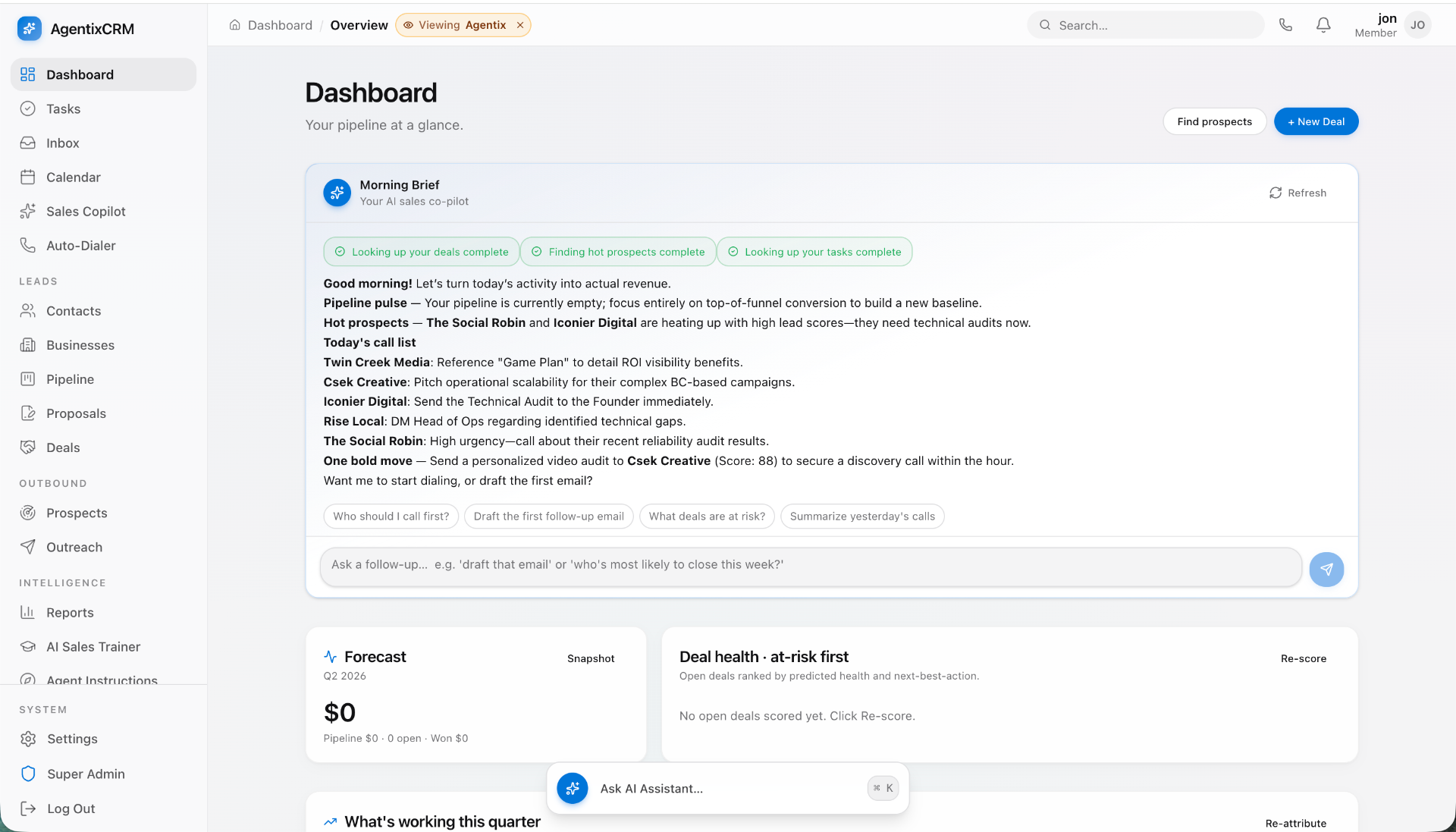
Now, imagine a portal that automates this. A new client signs up and is guided through an onboarding checklist, securely submitting their information. A real-time dashboard shows them project progress 24/7, deflecting status update emails. Your portal automatically pulls data from your tools via API and displays it in a beautiful, interactive dashboard.
Concrete Example: A digital marketing agency we know used to spend 8-10 hours per client per month just compiling and formatting performance reports. After building a portal with an integrated dashboard, that time dropped to less than 1 hour. For 20 clients, that’s 140+ hours saved every month—the equivalent of a full-time employee.
Create a Stickier, Defensible Client Experience
A great portal becomes embedded in your client's daily workflow. It's their single source of truth for your engagement. When all project history, communications, files, and critical data live inside your branded ecosystem, switching to a competitor becomes a massive pain. They would lose all that organized history. This is your competitive moat.
Your portal is the user experience of your service. A clunky, disjointed process based on email and shared folders feels amateur. A sleek, centralized, and self-serve portal feels professional, transparent, and high-value. It builds trust and demonstrates sophistication.
Unlock New Revenue Streams
Your portal isn't just a cost center; it's a platform for growth. Once you have an engaged user base of clients logging in regularly, you can begin to productize and upsell.
- Tiered Offerings: Offer a 'Standard' service level with basic portal access and a 'Premium' level with advanced analytics, more frequent data refreshes, or AI-powered insights.
- Add-On Services: Allow clients to request and purchase one-off services directly through the portal (e.g., an extra set of creative assets, an additional report).
- Self-Serve Tools: If parts of your service can be automated, you can offer them as a lower-cost, self-serve option within the portal, capturing a new segment of the market.
Centralize Your Single Source of Truth
“Which version of the design is the final one?” “Can you resend the invoice from March?” “Did the client approve this copy?”
A portal eliminates this ambiguity. It provides one canonical, timestamped, and permission-controlled location for:
- Files: All assets, deliverables, and contracts with version history.
- Communications: Comments and messages tied directly to specific projects or tasks.
- Decisions: Approvals and feedback are clearly recorded, not buried in an email thread.
- Data: Key metrics and reports are always up-to-date and accessible.
This isn't just about convenience. It’s about reducing risk, improving accountability, and ensuring everyone—on your team and the client's—is working from the same information.
The Core Features of a High-Value B2B Customer Portal
Don't try to boil the ocean. A successful portal launch starts with a focused MVP (Minimum Viable Product) that solves the most painful problems first. Then, you can iterate and add the 'wow' features.
Must-Have Features (The MVP)
This is your foundation. Getting these right is non-negotiable.
- Secure User Authentication & Permissions: The bedrock of your portal. Each client user needs a unique, secure login. You must have role-based access control (RBAC) from day one. For example, a 'Client Admin' can see billing and manage users, while a 'Client Viewer' can only see project progress. Don't skip this.
- Centralized Dashboard: The first thing a client sees. It should provide an at-a-glance summary of everything important: project status, upcoming deadlines, key metrics, and recent notifications. This dashboard needs to immediately answer the question, “What’s the state of our engagement?”
- Project/Task Management: A clear, simple view of what you’re working on, what stage it’s in, and who is responsible. This doesn't need to be as complex as Jira, but it must be more structured than a spreadsheet. Think Trello-like boards or simple task lists.
- File Sharing & Version Control: A dedicated and secure repository for all project-related documents. It needs to be better than Google Drive, with clear versioning, organization by project, and the ability to comment on files directly.
- Contextual Messaging & Comments: Move communication out of email and into the portal. Discussions should be tied to a specific project, task, or file. This creates a permanent, searchable record of all communication and decisions.
Next-Level Features (The 'Wow' Factor)
Once your MVP is stable and adopted by clients, you can layer on features that create a serious competitive advantage.
- Automated Reporting & Analytics: This is often the killer feature. Integrate directly with data sources (e.g., Google Analytics, HubSpot, Stripe, your own production database) via APIs. Present this data in interactive, customizable dashboards. You're saving your team hundreds of hours and giving clients real-time visibility they can't get anywhere else.
- Invoice & Billing Management: Integrate with a payment provider like Stripe. Allow clients to view and download past invoices, see their current payment status, update their credit card on file, and even pay invoices directly through the portal.
- Automated Client Onboarding: Create a guided, step-by-step workflow for new clients. Use forms to collect necessary information, securely capture credentials, and have them acknowledge key documents. This ensures consistency and frees up your team from manual setup.
- AI-Powered Features: This is where you can truly differentiate. A modern portal can leverage AI to provide exponential value. At Envert, we're building AI features into client portals that can automatically summarize long comment threads for an executive overview, analyze project data to flag potential risks or delays, or even generate draft report summaries based on performance data.
The Build vs. Buy Decision: Off-the-Shelf vs. Custom
This is a major strategic choice. There's no single right answer, but one path leads to a commodity experience, and the other leads to a competitive advantage.
Option 1: Off-the-Shelf Portal Software
Want this shipped, not just read about?
Book a free scoping call. We'll map the smallest billable wedge of your idea and tell you honestly if we're the right team to build it.
Book a free scoping callSee what we've shipped →
Tools like Softr, Client-Portal.io, or even configured versions of Zendesk or Zoho fall into this category. You use a no-code/low-code builder to assemble a portal from pre-built components.
- Pros: Lower upfront cost, faster to get something live, predictable monthly fees.
- Cons: You are fundamentally limited by the platform's features and roadmap. The user experience will feel generic. You can't tailor the workflow perfectly to your unique service. Your data is on their platform. And per-user pricing can become prohibitively expensive as you scale.
- Verdict: A good choice for early-stage businesses on a tight budget with a very standard service delivery model. It's a stepping stone, not a long-term solution. You're building on rented land.
Option 2: Custom-Built Portal
Here, you hire a team (like an in-house dev team or a studio like Envert) to design and build a portal from the ground up, tailored to your exact specifications.
- Pros: You own the intellectual property. The software is perfectly matched to your unique business logic, creating a powerful operational advantage. The user experience can be a key brand differentiator. The platform can evolve and scale with your business indefinitely.
- Cons: Higher upfront investment in time and money. Requires finding and managing a skilled technical partner.
- Verdict: The right choice for established businesses that see technology as a core differentiator. If your service delivery is unique, a custom portal is the only way to truly capture that value in software.
| Factor | Off-the-Shelf Software | Custom Development |
|---|---|---|
| Customization | Low to Medium | Complete |
| Upfront Cost | Low ($0 - $5k) | High ($40k+) |
| Speed to Launch | Fast (Days/Weeks) | Slower (Months) |
| Scalability | Limited by platform/pricing | Unlimited |
| Competitive Edge | None | Significant |
| Ownership | You rent it | You own it |
How to Build a Custom Portal: A Realistic Roadmap
Building a custom application is a systematic process. Rushing any of these phases leads to wasted money and a product that misses the mark.
Phase 1: Strategy & Scoping (Weeks 1-2)
This is the most important phase. Before you write a line of code, you must define the problem.
- Goal: Achieve crystal clarity on the MVP. What is the single biggest bottleneck the portal must solve for your team and your clients?
- Checklist:
- Interview at least 3-5 of your best clients. Where do they feel friction?
- Interview your internal delivery team. What manual tasks do they hate the most?
- Map your entire service delivery workflow, from sales handover to final offboarding.
- Write user stories: "As a [Client Manager], I want to [see all my projects on one dashboard] so that I can [quickly assess priorities]."
- Ruthlessly prioritize. Define the 3-5 core features for the MVP. Everything else goes on the V2 backlog.
Phase 2: UX/UI Design & Prototyping (Weeks 3-5)
Design is not just how it looks; it's how it works. Skipping this is like building a house without a blueprint.
- Goal: Create a complete, clickable prototype of the portal that you can test with real users before development begins.
- Process: Starts with low-fidelity wireframes (simple box diagrams) to map out user flows. It then moves to high-fidelity UI designs (the final look and feel). Finally, these are linked together in a tool like Figma to create a prototype that feels like a real app. This is a critical phase where a partner like Envert shines. We don't just build; we challenge assumptions and co-design the optimal user flow with you, saving costly development changes later.
Phase 3: Development & QA (Weeks 6-14)
This is where the designs are turned into a functional, secure, and scalable web application.
- Goal: Build, test, and deploy the MVP features defined in the strategy phase.
- Process: This should be an agile process, typically broken into 2-week 'sprints.' At the end of each sprint, your development partner should demo the completed work. This ensures there are no surprises at the end. Continuous Quality Assurance (QA) is vital; testing should happen in parallel with development, not just at the end.
- Tech Stack: A modern, robust stack might look like: React or Vue.js for the frontend; Node.js or Python for the backend; PostgreSQL for the database; and hosted on a cloud provider like AWS or Vercel.
Phase 4: Launch & Iterate (Week 15+)
Launch is not the finish line; it’s the starting line.
- Goal: Get the portal into the hands of your first clients, gather real-world feedback, and start planning V2.
- Process: Don't launch to all your clients at once. Start with a beta group of 3-5 friendly clients. Set up analytics and user feedback tools (like Hotjar or LogRocket) to see how it's being used. Their feedback is gold—use it to prioritize your V2 roadmap.
The Million-Dollar Question: How Much Does a Custom Portal Cost?
Let's get straight to it. Price varies based on complexity and who you hire, but here are some realistic, all-in ranges for a US-based development studio.
Key Cost Factors:
- Scope: A simple portal with a dashboard and file sharing is far less complex than one with 5 third-party API integrations, complex business logic, and AI features.
- Team: A solo freelancer might be cheaper per hour, but you bear the entire burden of project management, design, and QA. A studio provides a complete, managed team (PM, Designer, Engineers).
Ballpark Price Ranges for a Custom MVP:
- Lean MVP Portal ($40,000 - $75,000): This gets you the core, must-have features, a clean but template-based UI, and a solid technical foundation. Expect a 3-4 month timeline.
- Robust Business Portal ($80,000 - $150,000+): This includes a fully custom UI/UX design, a few key API integrations (e.g., for reporting or billing), and more complex features like automated onboarding. Expect a 5-7 month timeline.
- Enterprise-Grade Platform ($200,000+): This is for businesses building a true product. It involves multiple complex integrations, sophisticated permissions, custom analytics, and potentially AI features. The timeline is typically 8+ months.
Frame this as an investment, not a cost. If a $100,000 portal saves you from hiring two operations managers at $80,000/year each, your ROI is less than 8 months. And that doesn't even count the value of increased client retention and new revenue opportunities.
Ready to Build? Here’s Your Next Step
Hopefully, one thing is clear: a custom customer portal isn't just a piece of software. It's a strategic decision to productize your service, scale your operations, and build a more defensible business.
Building an application this critical to your business isn't something to leave to chance. You need a technical partner who understands both the technology and the business strategy behind it. You need more than just coders; you need product thinkers.
At Envert, we specialize in building these exact types of custom web applications for B2B businesses. We’re a US-based studio of senior designers and engineers who partner with founders to go from a rough idea to a launched, scalable, and valuable software asset.
If you're serious about building a customer portal that becomes a core part of your business, let's talk. Book a free, no-obligation scoping call with our team today. We'll help you map out your vision, define your MVP, and give you a concrete plan of action.
Frequently asked questions
Can't I just use a tool like Notion or Airtable for a client portal?+
You can for a while, but it's a temporary fix. These tools lack secure, per-client permissions, custom branding, and the ability to integrate deeply with your specific workflows. You'll quickly hit a ceiling on scalability and professionalism.
How long does it *really* take to build an MVP portal?+
For a well-scoped MVP with core features, plan for 3 to 5 months. This includes strategy, design, development, and testing. Rushing this process almost always leads to a poor user experience and technical debt that costs more to fix later.
What's the biggest mistake founders make when building a portal?+
The biggest mistake is building features based on assumptions instead of client feedback. Start by interviewing your best (and worst) clients to understand their real-world friction points. Building a beautiful solution to a problem nobody has is a fast way to waste money.
How do I handle user roles and permissions?+
Plan for role-based access control (RBAC) from day one. At a minimum, you'll need a 'Client Admin' who can see everything and invite team members, and a 'Client Member' with more restricted views. This prevents sensitive information like billing from being visible to everyone on the client's team.
What happens after the portal is launched? What are the ongoing costs?+
Launch is just the beginning. Budget for ongoing hosting (typically $100-$500/month for an early-stage app), monitoring, and a retainer for bug fixes and new feature development. A good rule of thumb is to budget 15-20% of the initial build cost annually for maintenance and improvements.