Building an Admin Dashboard Your Ops Team Actually Uses: The Founder's Guide
Stop wasting money on internal tools that gather dust. This founder-friendly guide breaks down how to build an admin dashboard your ops team will actually use to drive growth and efficiency.

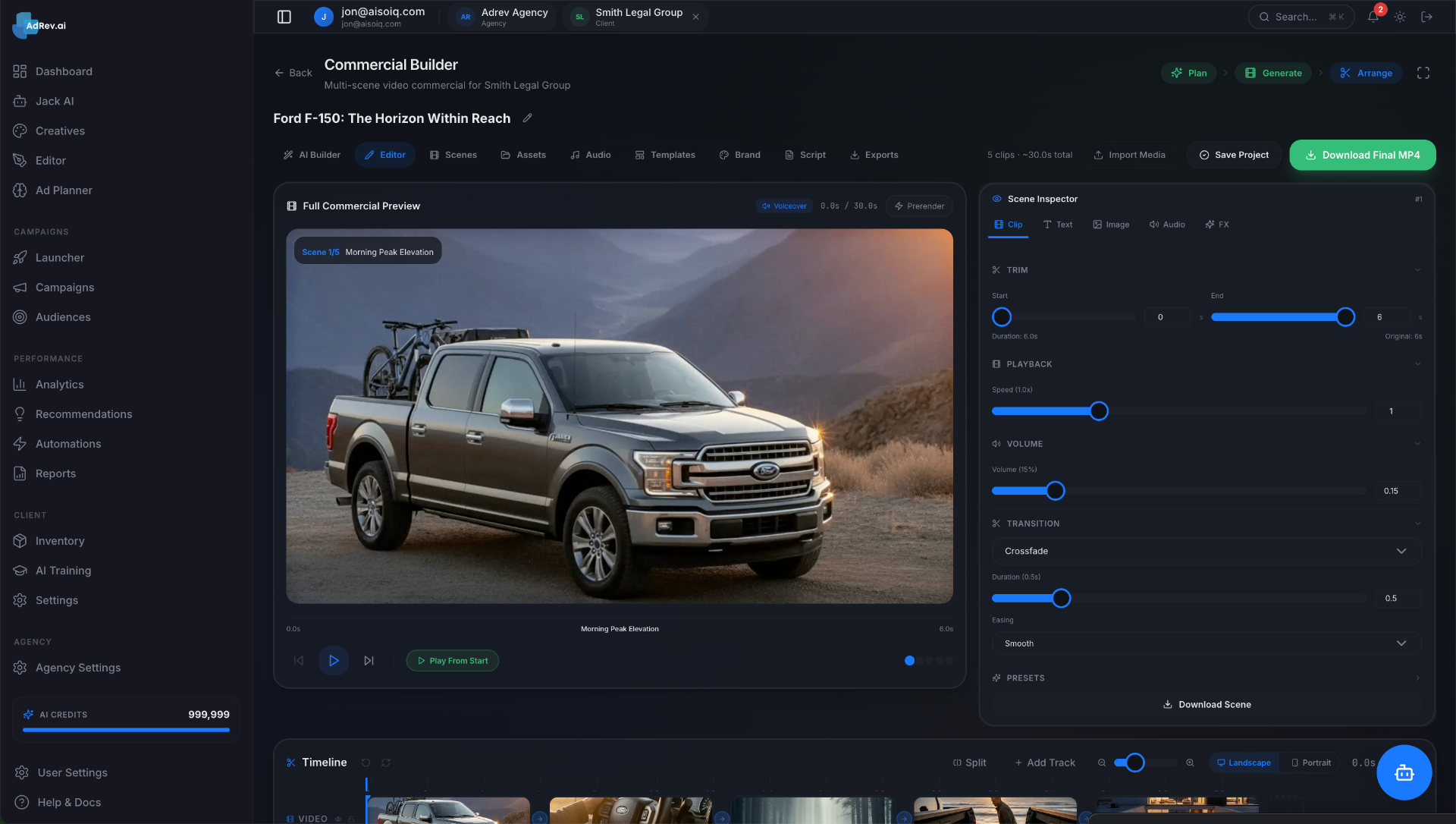
You’ve seen it happen. You spend $30,000 on a custom internal tool to “streamline operations.” Six months later, you walk past your support lead’s desk and see them managing customer refunds in a labyrinthine Google Sheet, occasionally glancing at the shiny, expensive, and utterly ignored admin dashboard on their second monitor.
This isn't a rare failure. It's the default outcome for most internal tools. They become a digital graveyard of good intentions and sunk costs.
The cost of a bad admin dashboard isn’t just the money you wasted building it. The real cost is the continued operational drag: the hours your team wastes on manual workarounds, the mistakes that slip through the cracks of a spreadsheet, and the inability to scale your processes as your business grows.
A great admin dashboard isn't just a cost center; it's a strategic asset. It's a force multiplier for your operations team, a source of truth for your business data, and a competitive advantage that lets you move faster and more efficiently than your rivals. Here’s how to build one that your team will not only use, but love.
Why Most Admin Dashboards Fail (And Cost You a Fortune)
Before we build, we must understand why others have failed. Most abandoned admin panels share a few common, fatal flaws. They aren’t technical failures; they’re failures of empathy and strategy.
Symptom 1: Built by Engineers, for Engineers
This is the classic mistake. Your engineering team, brilliant as they are, is tasked with building a tool for the operations team. Without proper direction, they build a tool they would want to use. It’s keyboard-driven, data-dense, and probably has a command-line interface feel. It’s powerful, but it’s completely unintuitive for a non-technical user whose primary job is talking to customers, not deciphering database schemas.
Your ops team doesn’t need to see raw JSON blobs or have 50 filtering options on a single table. They need a clear, simple interface that helps them complete a specific task—like issuing a refund or updating a user's subscription—in the fewest possible clicks.
Symptom 2: The "Just Ship It" MVP Mentality
You apply the MVP mindset to your customer-facing product, so it makes sense to apply it to internal tools, right? Wrong. The “Minimum Viable Product” approach often becomes an excuse for shipping a “Minimum Unusable Product.”
When you “just ship” an internal tool, you often skip the essential last 20%: UX polish, clear error handling, performance optimization, and thoughtful user onboarding. Unlike your external customers, your internal team doesn't have a choice. They are a captive audience. But that doesn’t mean they’ll adopt a tool that is slow, buggy, or confusing. They’ll simply revert to the old, inefficient process that they know works.
Symptom 3: Data Overload, Insight Famine
Another common failure mode is the “everything but the kitchen sink” dashboard. In an attempt to be helpful, you cram every possible metric and data point onto a single screen. The result is a cockpit for a space shuttle, when what your team needed was a steering wheel and a gas pedal.
Your support agent doesn't need to see a time-series graph of daily active users. They need to answer one question, right now: “What is this customer’s order history?” A dashboard that presents a wall of data without prioritizing the information needed to do the job at hand is just noise. It creates cognitive load and slows your team down.
The Core Principles of a High-Adoption Admin Dashboard
Building a successful dashboard requires a shift in mindset. You're not just hacking together a script; you're developing a product for an internal customer.
Principle 1: Treat It Like a Product. Your admin dashboard needs a product owner, even if it's a part-time role. Someone needs to be responsible for gathering user requirements, prioritizing features, and defining success. It needs a roadmap, a backlog, and a regular feedback cycle. Don't just build it and forget it.
Principle 2: Obsess Over the "Job to Be Done" (JTBD). Don't start by asking your team what features they want. Start by observing their workflows. What specific jobs are they trying to accomplish? A great framework for this is the JTBD sentence: "When [situation], I want to [motivation], so I can [expected outcome]." For example: "When a customer calls to ask for a refund, I want to find their order and process the refund in under 30 seconds, so I can move on to the next support ticket quickly."
Principle 3: Design for Speed and Scannability. Your operations team is paid to operate, not to analyze data. Their tools need to be blazingly fast and instantly understandable. Prioritize information hierarchy. The most critical information should be at the top, in large font. The most common actions should be big, clearly labeled buttons. Use whitespace, color, and typography to guide the user's eye, not overwhelm it.
Must-Have Features for a V1 Admin Panel
When you're scoping the first version, it's tempting to dream big. Resist the urge. Focus on a small set of high-leverage features that will solve 80% of your team's most painful problems. Everything else can wait for V2.
When we at Envert scope an internal tool project with a founder, we always push to start with a ruthless focus on the essentials. A V1 should be lean but powerful. Here’s a checklist of what we consider non-negotiable:
Rock-Solid User Management & Role-Based Access Control (RBAC): Don't give everyone admin keys to the kingdom. A junior support rep shouldn't have the ability to delete the entire user database. Define roles (e.g., Support, Admin, Finance) and give each role access only to the data and actions they absolutely need. This is a security and compliance must-have.
A "God Mode" (User Impersonation): This is the single most valuable feature for debugging and customer support. It's a button that lets an admin or support agent view the app exactly as a specific user would. It eliminates the endless back-and-forth of “Can you send me a screenshot?” and allows your team to solve problems instantly.
Centralized Detail Views (The Single Source of Truth): Your dashboard must have canonical pages for your core data models (Users, Orders, Subscriptions, etc.). The User Detail page, for instance, should be the one place your team can go to see everything about that user: their contact info, their order history, their support tickets, their last login date. It consolidates information scattered across multiple systems into one scannable view.
Key Action Buttons: Identify the 3-5 most frequent, high-impact actions your team takes and turn them into one-click buttons on the relevant detail pages. Think
[Approve Post],[Issue Refund],[Ban User],[Resend Welcome Email]. These buttons transform the dashboard from a passive data viewer into an active operational tool.Global Search & Filtering That Actually Works: The search bar should be the first thing your team looks for. It needs to be fast, forgiving of typos, and able to search across multiple fields (e.g., find a user by name, email, or user ID). Equally important are powerful, intuitive filters on your main data tables (e.g.,
show all orders with status='pending' from the last 7 days).
Want this shipped, not just read about?
Book a free scoping call. We'll map the smallest billable wedge of your idea and tell you honestly if we're the right team to build it.
Book a free scoping callSee what we've shipped →
Audit Logs: Who did what, and when? An audit log is a simple, chronological record of all significant actions taken within the admin panel (e.g., "Admin Jane Doe refunded order #1234 for $49.99"). It’s indispensable for accountability, security, and debugging when something goes wrong.
Build vs. Buy: The $50,000 Question
This is the eternal debate. Do you use an off-the-shelf tool like Retool or Forest Admin, or do you invest in a fully custom build?
When to Buy (Off-the-Shelf Solutions)
Off-the-shelf internal tool builders (Retool, Internal, Forest Admin, Appsmith) are powerful. They let you drag and drop components to build a UI that connects to your existing databases or APIs.
Pros:
- Speed: You can often build a functional V1 in a few days or weeks, not months.
- Lower Upfront Cost: You're paying a monthly subscription (typically $10-$50 per user per month) instead of a large one-time development fee.
Cons:
- The Per-Seat Pricing Trap: That $25/user/month fee seems cheap when you have 3 ops team members. It becomes a major expense when you have 50. It actively disincentivizes you from giving more of your company access to data.
- Customization Ceiling: These tools are flexible, but only up to a point. You will inevitably hit a wall where the specific workflow or unique UI you need is impossible to build without ejecting from the platform.
- Performance & Security: You're trusting a third party with access to your production data. Performance can also be a concern as you're limited by the architecture of the platform.
Verdict: Go with an off-the-shelf solution if your needs are standard CRUD (Create, Read, Update, Delete), you have a very small team, and you need something today.
When to Build (Custom Development)
Building a custom dashboard from scratch is a significant investment, but it's often the right strategic move for a growing business.
Pros:
- Perfect Fit: The tool is designed from the ground up to match your unique business logic and workflows. No compromises.
- Competitive Advantage: Your internal tooling can become a moat. If your dashboard allows your team to operate 2x more efficiently than a competitor, you win.
- Own Your IP: You own the code. You're not locked into a vendor. You control the roadmap, the performance, and the security.
- No Per-Seat Cost: You pay for the build, and then it's yours. It can be used by 5 employees or 500 with no added license fees.
Cons:
- Upfront Cost & Time: A custom build requires a significant investment of capital and time.
- Maintenance Overhead: You are responsible for hosting, updates, and bug fixes.
Verdict: Building a custom dashboard is our bread and butter at Envert. We believe it's the right move when your operational workflows are a core part of your competitive advantage, when off-the-shelf tools can't meet your specific needs, or when you're scaling your ops team and the per-seat cost of SaaS tools becomes prohibitive. It’s an investment in your company's core operational infrastructure.
Scoping Your Custom Admin Dashboard: A Realistic Budget and Timeline
"So, what will it cost?" It's the question on every founder's mind. Here are some realistic, all-in price ranges you can expect when working with a high-quality, US-based studio like Envert. These figures include strategy, UX/UI design, development, testing, and project management.
Simple CRUD Dashboard (The Starter Pack):
- Scope: A tool for managing 1-2 core resources (e.g., users and orders) with basic search, filtering, detail views, and key action buttons. Connects to an existing, well-documented API.
- Timeline: 4-6 weeks
- Budget: $25,000 - $40,000
Mid-Complexity Operational Hub (The Growth Engine):
- Scope: Manages multiple resources, includes RBAC, audit logs, user impersonation, and integrations with 1-2 third-party APIs (e.g., Stripe for payments, Intercom for support). Includes a custom design system.
- Timeline: 8-12 weeks
- Budget: $50,000 - $85,000
Complex Internal Platform (The Command Center):
- Scope: Everything in the mid-tier, plus complex custom workflows, advanced data visualizations, integrations with multiple internal and external systems, and potentially AI-powered features like fraud detection or content moderation suggestions.
- Timeline: 16+ weeks
- Budget: $100,000+
These are not freelance developer numbers. This is the cost to have a dedicated team design and build a professional, reliable, and scalable tool that will be a core part of your business for years to come.
The Process: From Idea to a Tool Your Team Loves
How do you get from a Google Sheet to a beloved internal tool? Follow a product development process.
User Interviews & Observation: Sit down with your ops team. Don't ask them what they want. Ask them to show you how they work. Watch them use their current tools (or spreadsheets). Where do they get stuck? What takes the most time? What are the most common mistakes?
Workflow Mapping: Get in a room with a whiteboard. Map out the entire process you're trying to improve, step by step. Identify the decision points, the data requirements, and the actions taken at each stage. This map becomes the blueprint for your dashboard.
Low-Fidelity Wireframing: Before a single line of code is written, design the interface in a tool like Figma. Create simple, black-and-white wireframes that focus on layout and information flow. Click through these wireframes with your ops team. Is the flow intuitive? Is the most important information easy to find? Iterate here, where changes are cheap, not in code.
Phased Rollout & Feedback: Don't do a “big bang” release. Launch the V1 to one or two of your most tech-savvy team members first. Let them be your champions and your early-warning system. Gather their feedback, fix the inevitable bugs, and then gradually roll it out to the rest of the team. Set up a dedicated Slack channel for feedback and bug reports.
An admin dashboard is one of the highest-leverage investments you can make in your business's scalability. Done wrong, it's a frustrating money pit. Done right, it’s the silent engine of operational excellence, empowering your team to do their best work and giving you the foundation you need to grow.
If you're tired of fighting with spreadsheets and want to build an internal tool that acts as a true force multiplier for your team, let’s talk. At Envert, we specialize in designing and building custom web apps, internal tools, and SaaS platforms that drive real business results.
Book a free, no-pressure scoping session with our team. We'll help you map your workflows, define your MVP, and give you a concrete plan to build the admin dashboard your team will actually use.
Frequently asked questions
How much does a custom admin dashboard cost to build?+
The cost varies with complexity. A simple dashboard from a US-based studio might cost $25k-$40k, a mid-complexity one $50k-$85k, and a highly complex platform with unique integrations could exceed $100k. The price reflects strategy, design, development, and project management.
What's the difference between an admin dashboard and a BI tool like Tableau?+
An admin dashboard is for *action*, while a BI tool is for *analysis*. Your admin panel lets you do things like refund an order or ban a user. A BI tool lets you analyze trends on thousands of orders to see your refund rate over time. You operate with an admin panel; you strategize with a BI tool.
Should my own engineers build our internal tools?+
It depends on the opportunity cost. If your engineers are building an admin panel, they aren't building your core, customer-facing product. For early-stage startups, it's often more effective to have your team focus on the core product and hire a specialized studio for internal tools.
How long does it take to build a basic admin dashboard?+
A basic but professional admin dashboard focused on core CRUD (Create, Read, Update, Delete) functionality for 1-2 data types can typically be designed and built in 4-6 weeks by an experienced team. More complex requirements will extend this timeline.
What are the biggest mistakes to avoid when building an admin panel?+
The top three mistakes are: building a tool for engineers instead of the actual non-technical users; shipping an unfinished MVP that's frustrating to use; and cluttering the interface with too much data instead of focusing on the specific task the user needs to accomplish.